
Download VisualCV – Resume Builder, Online Portfolio, Job Search Tool
Overview
VisualCV is a web-based desktop application designed to help job seekers create professional, visually appealing resumes that perform well across digital platforms. The software streamlines the resume creation process through an intuitive wizard, enabling users to generate documents optimized for web, mobile, and PDF formats. It is particularly useful for individuals navigating competitive job markets who need to present their qualifications in a dynamic, modern format.
Designed with career development in mind, VisualCV addresses common challenges such as resume visibility, outdated formatting, and lack of personal branding. It empowers users to build resumes that not only stand out visually but also rank well in search engine results, increasing the chances of being discovered by recruiters. The platform supports professionals, recent graduates, freelancers, and career changers who seek to enhance their employability through a polished digital presence.
VisualCV allows users to claim a personalized URL, which serves as a central hub for their professional identity. This feature supports long-term career growth by enabling continuous updates and version tracking. The application also integrates multimedia elements, allowing users to showcase projects through images, videos, and presentations—making it ideal for creative and technical fields.
Key Features & Capabilities
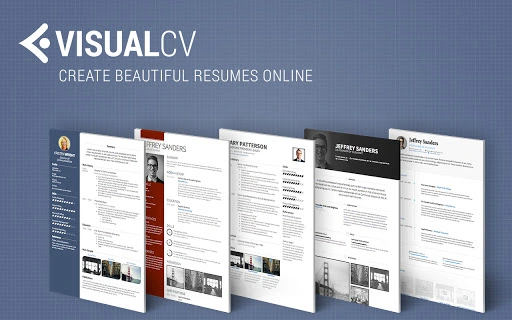
- Professionally designed resume templates – Choose from a curated selection of modern, ATS-friendly layouts that reflect industry standards and enhance readability across devices.
- Resume Analytics – Monitor how often your resume is viewed and downloaded. Track detailed insights such as IP addresses, referral sources, and unique visit links to measure outreach effectiveness.
- Version control – Create and manage multiple resume versions tailored to specific job applications, ensuring precision in alignment with each role’s requirements.
- Search engine optimized (SEO) profile – Your VisualCV profile is indexed by search engines, helping recruiters find you when they Google your name, which strengthens personal branding.
- Multimedia portfolio integration – Embed videos, images, presentations, and other media to demonstrate your work, adding depth and credibility to your application.
- Resume import and export – Import existing resumes from Word (.doc, .docx) or PDF files, and LinkedIn profiles. Export final versions as PDFs for submission to employers.
These capabilities support a seamless workflow from drafting to sharing. For example, a graphic designer can embed a portfolio reel directly into their resume, while a software developer can link to GitHub repositories. The ability to track resume views allows users to follow up strategically with hiring managers after their application is viewed.
User Interface, Workflow & Performance
The user interface of VisualCV is clean and focused on simplicity, with a step-by-step wizard guiding users through each stage of resume creation. Navigation is intuitive, with clearly labeled sections for personal information, work experience, education, skills, and portfolio integration. The layout adapts smoothly across different screen sizes, ensuring consistent usability on desktops and laptops.
Workflow efficiency is enhanced by the built-in import functionality and real-time preview. Users can see changes instantly, reducing the need for trial-and-error formatting. The platform operates entirely in the browser, which means no local installation is required, and all data is stored securely online.
Performance observations are based on general software behavior patterns. The developer did not specify resource usage details. However, given the lightweight nature of the application (2.3 MB), it is expected to run efficiently on most modern systems. Stability is maintained through cloud-based infrastructure, minimizing crashes or data loss during use.
Compatibility & System Requirements
VisualCV is compatible with Windows, Mac, and Linux operating systems, making it accessible to a broad user base. As a web-based application, it does not require a dedicated desktop installer, allowing users to access their profiles from any device with a modern browser.
The application has a lightweight footprint of 2.3 MB, indicating minimal storage demands. However, exact system requirements were not listed. Users should ensure they have a stable internet connection and a supported browser (such as Chrome, Firefox, or Safari) to use the full range of features.
Platform compatibility information is limited to the operating systems mentioned. No additional hardware or software prerequisites were provided by the developer.
Pros and Cons
Pros
- Free forever with optional premium templates
- Professional, modern resume designs
- Comprehensive resume analytics and tracking
- Supports multimedia portfolio integration
- Easy import from Word, PDF, and LinkedIn
- SEO-optimized online profile for better visibility
- Version control for tailored job applications
Cons
- Requires constant internet connection for full functionality
- No offline editing mode available
- Advanced features limited to premium templates
- Dependent on browser performance and internet speed
- Limited customization in free version
FAQ Section
Is VisualCV free to use?
Yes, VisualCV is free to use for core features, including resume creation, import from Word or LinkedIn, and export to PDF. Premium templates are available for a fee, but the basic functionality remains free forever.
Can I use VisualCV offline?
No, VisualCV is a web-based application that requires an active internet connection to access and edit your resume. There is no offline mode or desktop app for standalone use.
Is my data secure on VisualCV?
VisualCV uses secure cloud storage to protect user data. While specific security protocols were not detailed, the platform is designed to safeguard personal and professional information during transmission and storage.
How often are updates released?
Updates are released regularly to improve functionality, fix bugs, and enhance user experience. The latest version, 2024.1, was released on March 15, 2024.
What types of files can I import into VisualCV?
You can import resumes from Microsoft Word (.doc, .docx), PDF files, and LinkedIn profiles. This allows users to quickly transfer existing content into a new, visually enhanced format.
Final Thoughts + CTA
VisualCV stands out as a powerful, accessible tool for anyone serious about advancing their career. Its combination of professional templates, resume analytics, and multimedia integration provides a holistic solution for modern job seekers. The ability to track resume views and tailor content for specific roles gives users a strategic advantage in competitive hiring environments.
While the lack of offline functionality may be a limitation for some, the benefits of cloud-based access, real-time collaboration, and continuous updates outweigh this drawback for most users. The platform is ideal for professionals, students, and freelancers aiming to build a strong digital presence.
With a free tier that offers robust features and a seamless workflow, VisualCV delivers exceptional value. Download VisualCV now and take control of your career journey with a resume that works as hard as you do.







